Author – Zaid Qureshi

Cloud migration is the method of moving data, applications, database and digital business operations into the cloud.
Cloud migration is something like a physical move, only it includes moving applications, data, and IT processes from particular DataCenters (DCs) to different DCs, rather than packing up and moving physical product. Very similar to a move from a smaller workplace to a bigger one. Cloud migration needs quite a ton of preparation, however typically it lands up being definitely worth the effort, leading to price savings and better flexibility.
“Cloud migration” usually means move from on-premises or legacy infrastructure to the cloud, sometimes it can refer to as migration from one cloud to a different cloud.
What does Legacy Infrastructure means?

Code or hardware is taken into account as legacy if it’s not running the latest version however still it is being used. As a result, legacy products are inefficient and insecure as compared to the latest ones. Companies which are still using these outdated systems are in peril of falling behind their competitors and have a high chance of their data getting breached.
/xp-56aa11bc5f9b58b7d000b196.jpg)
Outdated hardware or software have a high chance of running slowly, becoming unreliable and venders might stop updating it. For example, Windows XP is an outdated OS, its features are exceeded by newer releases of Windows, it is not updated or patched by Microsoft.

Legacy Infrastructure includes several components such as networking appliances, servers, applications and databases. Outdated devices like old servers or physical firewall appliances, might impede a company’s business processes and adds a lot of security risks as the original manufacturers drop support for their products, hence making old devices prone to security risks.
It is usually hosted on-premises, that means it’s physically settled on property or in buildings wherever the company operates.
Benefits of Migrating to Cloud:

Cost: Corporations that move to the cloud usually immensely cut back the amount they pay for IT operations, since the cloud suppliers handle maintenance and upgrades. So instead of focusing on maintenance and upkeeping of servers, they can focus a lot of resources on developing new products or improving existing ones.
Performance: For a few businesses, moving to the cloud might allow them to boost performance and therefore the overall user experience for their customers. If their application or web site is hosted in cloud data centers rather than in different on-premises servers, then data won’t have to cover as much distance to reach the users, thus reducing latency.
Scalability: Cloud computing can support larger workloads and bigger numbers of users much more simply than on-premises infrastructure, which needs corporations to get and install extra physical servers, networking appliances, or licenses.
Flexibility: Users, whether or not they are staff or customers, have access to the cloud services and data they have from anyplace. This makes it easier for a company to extend its services into new areas, provide their services worldwide, and let their staff work flexibly.
Challenges of Migrating to Cloud:
Migrating giant databases: Usually, databases have to be moved to a distinct platform altogether so as to perform within the cloud. It is difficult to move databases, especially if large amount of data needs to be moved. Some cloud providers give the facility to load data in a hardware device and ship it to the cloud. Database can also be transferred over the web. Despite the strategy, migrating database usually takes lots of time.
Data integrity: After transferring data, it is critical to ensure that data is intact and secure, and that it hasn’t been leaked while moving.
Business Continuity: A business has to make sure that its legacy systems are working and are available throughout the migration. Overlapping some data in on-premises and cloud is necessary to ensure availability, for example, its important to copy all the data to the cloud before shutting down the on-premise database. This should be moved little bit at a time.
How does an on-premises-to-cloud migration work?
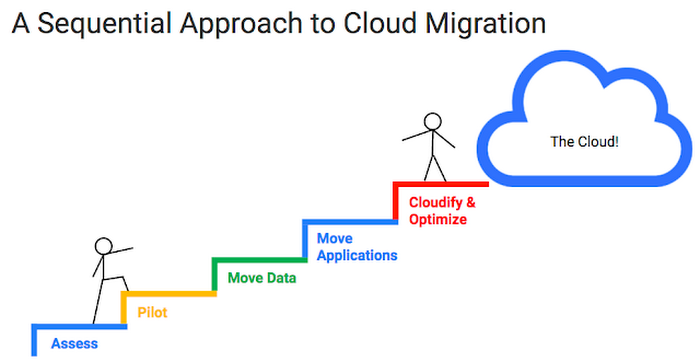
Different companies follow different method for cloud migrations. Cloud suppliers will facilitate businesses set up their migration method. Generally, these basic steps are followed:
1. Establish goals: A company should establish goals to measure against the new set up. This might include expected performance gains, legacy infrastructure outdate time. This helps to compare if migration is good idea or not.
2. Prepare a security strategy: A distinct approach is needed for Cloud cybersecurity compared to on-premises security. Within the cloud, company assets aren’t any longer behind a firewall, and therefore the network perimeter basically doesn’t exist. Deploying a cloud firewall or a web application firewall is also necessary.
3. Copy over data: Choose a cloud vendor, and copy existing databases. This needs to be done continuously throughout the migration process so that the cloud database remains up-to-date.
4. Move business intelligence: It should be checked that whether the application or code needs to be changed. An application should only be refactored if it makes financial sense to do so. If online migration is done, bandwidth calculation should be done.
5. Switch production from on-premises to cloud: Workload should be optimized and stress tested to deliver expected performance. The cloud goes live. The migration is complete.
Companies might close their on-premise systems, or might keep them for backup or for Hybrid-Cloud deployment.
Various Cloud Deployment Styles:

Organizations need to decide which deployment style to choose.
Multicloud: Two or more public clouds are combined in this, which are shared by more than one customer. It serves multiple purposes such as backup/redundancy, cost efficiency, taking different services from different clouds.
Public Cloud: In this, services are provided by a third-party provider over the internet. It has many advantages, and as a result it is the most common type of deployment. Example- AWS, GCP and MS Azure.
Private Cloud: In this, cloud resources are used only by single company. Example- Hewlett Packard Enterprise (HPE), Dell, IBM and Oracle.
Hybrid Cloud: It merges two or more types of clouds, i.e. public clouds, private clouds or on-premise legacy datacenters. It needs tight integration among all deployed clouds and datacenters to work well.
Single Cloud: Using a single cloud is not feasible but can be done. Cloud vendors offer public and private clouds, private can’t be shared with other organizations.
Conclusion:
Even though there are a few challenges in migrating to cloud, it is worth the effort to do so as cloud offers many benefits and can help a company grow or sustain in the market.
 Zaid's blog