Be yourself; Everyone else is already taken.
— Oscar Wilde.
This is the first post on my new blog. I’m just getting this new blog going, so stay tuned for more. Subscribe below to get notified when I post new updates.
All things Techie.
Be yourself; Everyone else is already taken.
— Oscar Wilde.
This is the first post on my new blog. I’m just getting this new blog going, so stay tuned for more. Subscribe below to get notified when I post new updates.
By – Mohammed Zaid Qureshi.

“Disk mirroring, also known as RAID 1, is the replication of data to two or more disks.”
As all drives are operational, data is read from them at the same time continuously, that results in reading operations being really quick. The RAID array will work even if one drive is in working condition. Write operations, are slow as all write operations are done two times.

If a drive malfunctions, the data is safe on the second disk and the continues to service the host’s data requests from the remaining disk of a pair. When the malfunctioned disk is replaced with a new one, the data copied by the controller from the remaining disk of the mirrored couple.
Mirroring allows quick recovery if a disk malfunctions. But, disk mirroring gives only data protection and it is not a replacement for data backup. Mirroring continuously fetches alterations in the data, on the other hand, a backup captures point-in-time images of the data.
Mirroring includes copying of data — the proportion of storage capacity required is double the amount of data being stored. Hence, mirroring is considered costly and is recommended for important softwares that cannot afford the risk of any data loss. Mirroring increases read performance as read requests can be processed by both the disks. But, write performance is a bit lower than that in a single disk because each write request is processed twice as two writes on the disks.
Mirroring is either software or hardware based. Hardware-based mirroring is applied by using RAID controllers in the system to which different hard disks are connected. At the cost of little system performance deterioration, fault tolerance is introduced to the system.
Disk Mirroring can provide data protection but at the cost of write performance, but it can increase the read performance significantly. It is costly and is only used for very important files. Hence it should be used wisely.
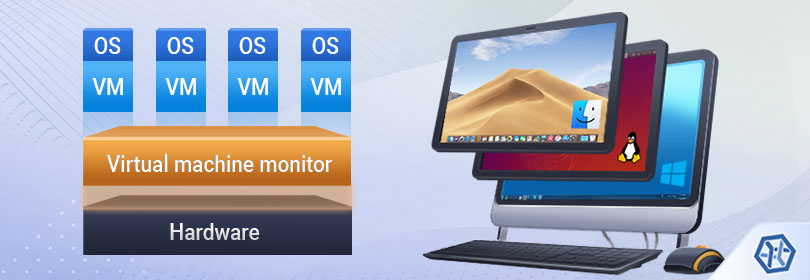
A Virtual Machine is a type of server that uses software to run programs and run apps on a physical server. It can run on any type of server, such as a physical PC.
Virtual machines are becoming more prevalent in cloud computing. They are typically used for various use cases such as multi-tenant cloud computing, batch processing, and remote desktop.
Virtual machines are desktop software that behaves like a full-fledged computer in an app window. They can run different operating systems and test applications in a secure, sandboxed environment.
Roles and Applications of VMs:
Functionality of Microsoft azure:
Services of Microsoft Azure:

Azure virtual machine:
Azure Virtual machine will let us create and use virtual machines in the cloud as Infrastructure as a Service. We can use an image provided by Azure, or partner, or we will use our own to make the virtual machine. Compute, Networking, and Storage elements are going to be created during the provisioning of the virtual machine.
Load Balancing:
An Azure load balancer is employed to distribute traffic loads to backend virtual machines.
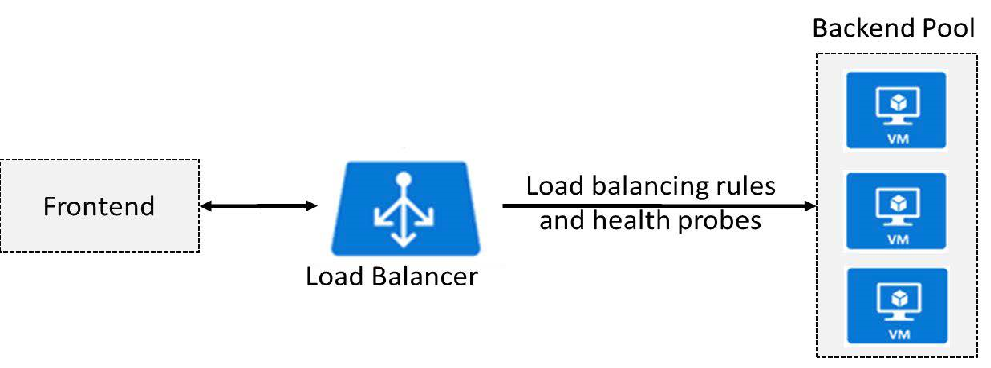
Features of Azure load balancer:
Azure Storage:
Once the user creates the storage account, they will select the extent of resilience needed and Azure will lookout of the remainder. A single storage account can store up to 500TB of knowledge and like all other Azure service, users can cash in of the pay-per-use pricing model. Blob Storage, Table Storage, Queue Storage and File Storage are available to Standard users. Data storage on SSD drives for better I/O performance is available to premium users.
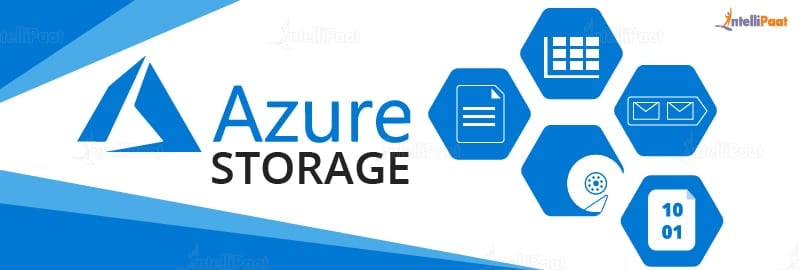
Azure Blob Storage:
Blob Storage is Microsoft Azure’s service for storing large objects or blobs which are generally composed of formless data like text, images, and vids, in confluence with their metadata. Blobs are stored in directory-suchlike structures called “containers.” Three types of tiers provided by Azure are:
Apart from Blob storage, Azure offers Table Storage, Queue Storage and File Storage for storing data in key-value pairs, queues and sharing of files respectively.
Azure Automation:
It enables you to automate tasks which would typically bog down and occupy IT and service desk personnel time.
In summary, the benefits are;

Azure SQL:
SQL Azure is Microsoft’s RDBMS for the cloud. Because it’s supported SQL Server, developers can apply what they realize SQL Server to SQL Azure immediately. Azure SQL Database, a completely managed platform as a service (PaaS) database machine that handles utmost of the operation functions like upgrading, fixing, backups, and monitoring without end-user involvement. Azure SQL Database is generally running on the newest stable interpretation of the SQL Server database machine and fixed OS with99.99 availability.
Steps of creating website using visual studio:
1. Make a development folder.
2. Open Visual Studio Code
3. Open your development folder
4. Add a file.
5. Begin coding!
<html>
 <head>
  <title>Hello World</title>
 </head>
<body>
 <h1>Hello World</h1>
</body>
</html>
6. Save your file as .html.
7. View your HTML file in the browser.
8. You have successfully created your website.
We have seen what is a VM, services of Azure and how to create a website using Visual Studio. As Azure offers many services, it is a great option as a Cloud Service Provider.
Author – Zaid Qureshi
Although you may not have heard about them recently, distributed denial of service (DDoS) attacks have increased in frequency and size with the internet’s growth. Fortunately, our options for dealing with these threats have grown as well. One of the greatest approaches uses the Cloud’s natural distributed nature to defend servers against malicious traffic all across the world. Cloud DDoS Protection or Cloud Anti-DDoS is the term for this.
What is DDoS Attack?
A DDoS attack happens when a dispersed network of devices delivers an enormous volume of fraudulent data to a target server or network, thereby denying service by crowding out genuine users trying to access the site during the attack. These hostile networked devices are generally either purpose-built servers dedicated to the assault (if the attacker has financial resources) or a “botnet,” which is a collection of malicious networked machines (a network of bots).
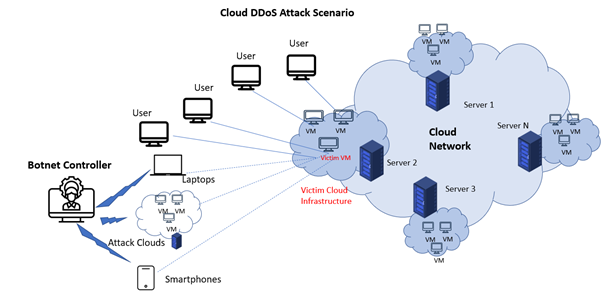
In virtualized multi-tenant systems, an infrastructure cloud often contains many servers ready to handle virtual machines. Attackers may target economic sustainability criteria of cloud users while launching a cloud DDoS assault. This assault has been dubbed the FRC (Fraudulent Resource Consumption) attack after a few other contributors. DDoS assaults are used to plant trojans and bots on weak workstations across the target web services and the Internet.
Botnets are made up of infected equipment, including internet-connected home gadgets. Some of these “bots” include computers, laptops, and servers, but the bulk are things you may not expect, such as a home-networked security camera system or a refrigerator. Malicious malware may even be embedded in online adverts, leading your phone to be attacked while you are playing an ad-supported game. Attacking machines may be found almost anywhere, and they all work together to eliminate the victim.
Protection in Cloud:
You need a worldwide network to defend yourself since the botnet has a global network. This is where Cloud DDoS Protection (also known as Cloud Anti-DDoS) comes into play. Attacking traffic is cleaned near the source, not at the destination, using numerous global scrubbing centres. The attacker traffic never even makes it close to your server.
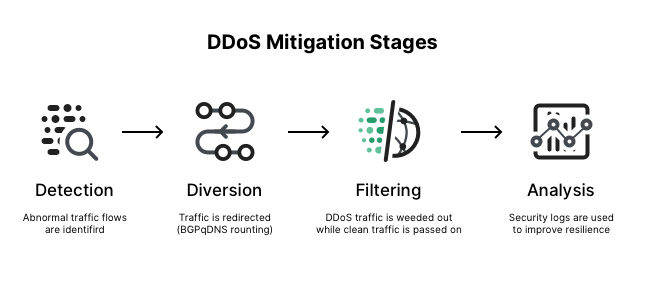
You don’t need an army of thousands, unlike the botnet. Scrubbing should be handled by a few focused, high-bandwidth nodes. Otherwise, our traffic will become backed up and sluggish. The trick is to strike the correct balance between preventing attacks and allowing legitimate traffic to flow without interruption.
This technique not only allows for scalability, but it also avoids the remainder of the network from being crowded during an attack by cleaning the data near the source.
A cloud DDoS solution can automatically build protection for zero-day and unknown DDoS attacks in real-time within seconds, thanks to behavioural-based detection and real-time signature development technology.
DDoS protects across the network and application levels, including volumetric and non-volumetric attacks, as well as full coverage of SSL-based DDoS attacks.
Some features of Cloud DDoS Protection are:
Adaptive security: With an ML system trained locally on our apps, we can automatically detect and help prevent high-volume DDoS attacks.
Hybrid and multicloud installations are supported: Whether our application is installed on Cloud or in a hybrid or multicloud architecture, we can help protect it from DDoS or web assaults by enforcing security standards.
Pre-configured WAF rules: Pre-configured WAF rules are out-of-the-box rules based on industry standards that assist guard against common web-application vulnerabilities and the OWASP Top 10.
Bot administration: Through native integration with reCAPTCHA Enterprise, provides automatic bot protection for our apps and helps combat fraud in line and at the edge.
Limiting the rate of change: Rate-based restrictions safeguard our apps from excessive volumes of requests that overwhelm our instances and prevent genuine users from accessing them.
Access control based on IP address and location: Filter inbound traffic using IPv4 and IPv6 addresses, as well as CIDRs. Determine and enforce access controls based on incoming traffic’s geographic location.
Attacks in the Future:
In the future, DDoS-for-hire services will be the future of DDoS attacks, with cloud infrastructures and Internet of Things devices becoming important attack sources and targets.
Knowledge of scalability, resource pricing, other details, and users’ behaviour may be used in volumetric but smart assaults.
Both sides are viewed as armies, with the winning army often having greater resources. However, when it comes to DDoS assaults in cloud computing, we’re seeing a distinct pattern.
In this case, the victorious side may not be the one who spends the most on resource acquisition.
References:
[1] Ishtiaq Ahmed, Sheeraz Ahmed, Asif Nawaz, Sadeeq Jan, Zeeshan Najam, Muneeb Saadat, Rehan Ali Khan and Khalid Zaman, “Towards Securing Cloud Computing from DDOS Attacks” International Journal of Advanced Computer Science and Applications(IJACSA), 11(8), 2020.
[2] G. Somani, M. S. Gaur, D. Sanghi, M. Conti, M. Rajarajan and R. Buyya, “Combating DDoS Attacks in the Cloud: Requirements, Trends, and Future Directions,” in IEEE Cloud Computing, vol. 4, no. 1, pp. 22-32, Jan.-Feb. 2017, doi: 10.1109/MCC.2017.14.
Author – Zaid Qureshi
Security is included in the services of AWS in accordance with security best practices, and documents how to use the security features. Ensuring the confidentiality, integrity, and availability of user’s data is of the utmost importance to AWS, as is maintaining their trust and confidence.
A glance at security in the AWS Cloud:
Certifications and accreditations: To gain trust and prove it’s security, AWS has successfully completed multiple audits, AWS has achieved ISO 27001 certification, and has been validated as a Level 1 service provider under the PCIDSS and now publishes a Service Organization Controls 1 report.
Physical security: Knowledge of the location of the data centers is limited to those within Amazon who have a legitimate business reasons for this information. These locations are secured physically in a wide variety of ways to stop any malicious activity.
Secure services: Each service in AWS is designed to be secure. These services are created in such a way so that it can block the unauthorized access.
Data privacy: Private and business data can be encrypted by the users in the AWS cloud, and their customers can protect their by using the data published for backup and redundancy procedures for services and keep their applications running.
Security Challenges in the Cloud:

The cloud computing service has various privacy and security concerns:
Outsourcing: Users may lose control of their data. Appropriate mechanisms needed to prevent cloud providers from using customers data in a way that has not been agreed upon in the past.
Extensibility and Shared Responsibility: There is a trade-of between extensibility and security responsibility for customers in different delivery models.
Virtualization: There needs to be mechanisms to ensure strong isolation, mediated sharing and communication between virtual machines.
Multi-tenancy: There are a lot of risks in sharing the resources with others, especially when sensitive data is being stored in the cloud, as many clients can share the same resource, privacy is a big challenge in cloud.
Everyone is concerned about security in a multi-tenant environment. In every layer of the cloud application architecture security should be implemented. Physical security is of course handled by the service provider, which is an additional benefit of using the cloud. Network and application-level security is user’s responsibility.
eDDoS (economic Distributed Denial of Service):
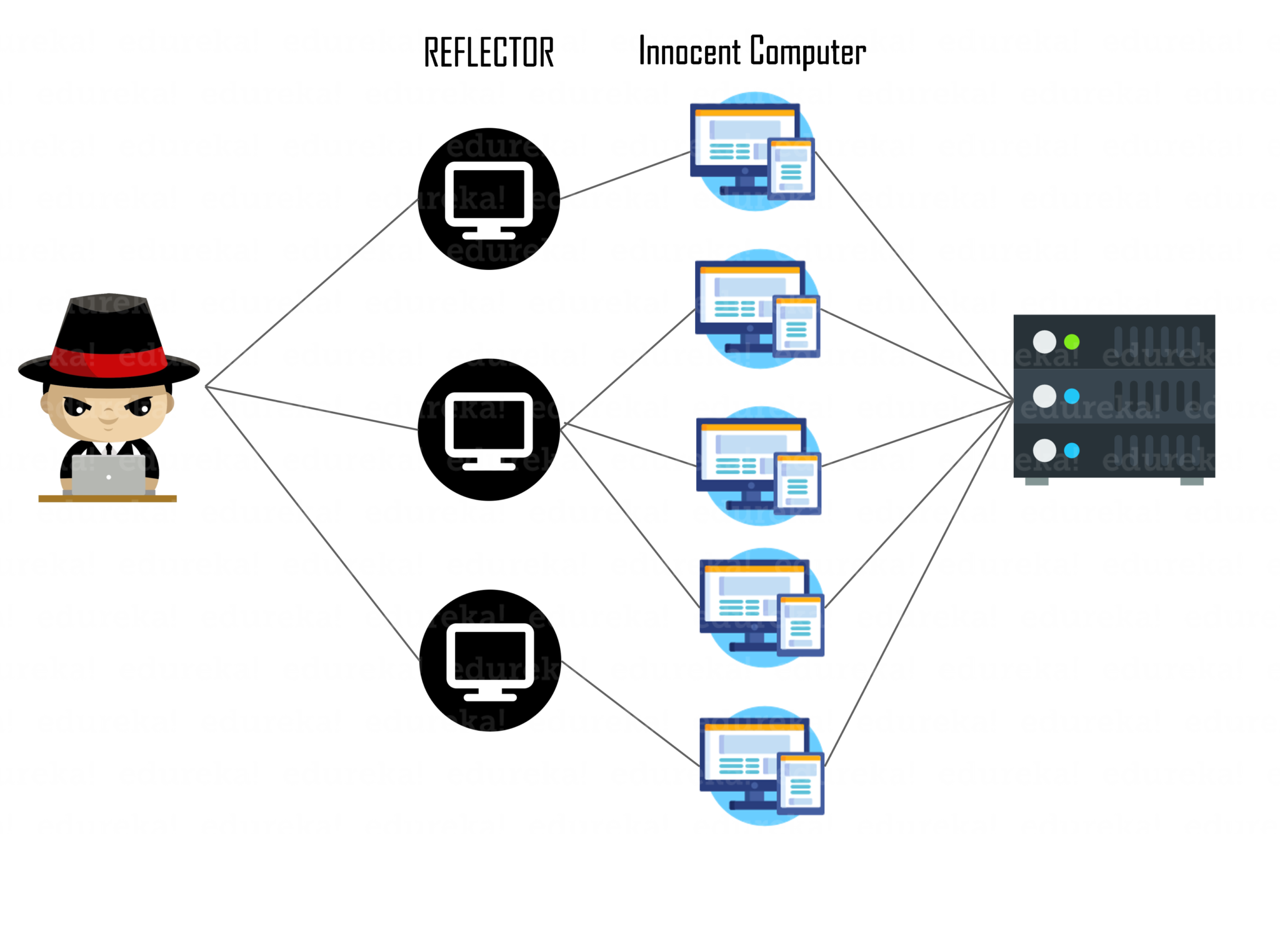
DDoS attacks causes eDDoS in the cloud, in which the availability to the genuine user is never denied. But the service provider who is using cloud will incur a hugely increased bill by using highly elastic capacity to unwillingly serve a large amount of unwanted traffic in order to maintain the availability. Hence it is necessary to drop the DDoS before the billing mechanism starts for the service provider.
Cloud Storage security:
Data storage is one of the most commonly used cloud service, any amount of data end users can be outsourced to cloud servers to enjoy virtually unlimited hardware/software resources and access, with no or little investment.
The data is stored elsewhere. We can not be sure no one can access it. If something affects storage provider, like outages or malware infections, that will directly impact access to your data. The storage is shared between different clients as needed. The data might be at risk if others are using your servers as well.
RESPONSIBILITY FOR CONTROLS IN CLOUD COMPUTING

Cloud computing only transfers the responsibility to perform compute task according to certain parameters, but accountability remains with the Client. The decision of whether the Client or the Provider is responsible for a given control depends on these factors:
Client is always responsible for securing the computing resources it retains. All other security controls become void if the Client fails to deploy controls to protect the servers, notebooks, and networks that it uses to access the Provider. It is entirely the Client’s responsibility to implement suitable controls to prevent client-side threats such as the web browser vulnerabilities, theft of authentication credentials, virus attacks, or data theft by rogue employees.

Consequently, we obtain the following responsibilities:
• In all three cloud models, the Provider is responsible to implement and operate suitable infrastructure controls such as employee training, physical site security, network firewalls, and others. Infrastructure controls are of fundamental importance.
• In IaaS, the Client manages and controls all software that runs on the Provider’s infrastructure. As such, the Client is responsible for all software security controls, including software patching, anti-virus protection, application access control, user identity management, and others.
• In PaaS, the Client manages and controls the application software, while the Provider manages the OS, infrastructure, middleware. The Client is responsible for all app controls, while the Provider is responsible for the IT general controls .
• In SaaS, the Provider manages and controls all layers of the software stack and is accordingly responsible for their security. In other words SaaS providers are responsible for implementing suitable security controls in their infrastructure, operating systems and middleware, as well as application software.
Conclusion:
Cloud has its own benefits and provides security, but along with it comes the risks and challenges of using cloud. By understanding the proper documentation of the Cloud Providers and using the security best practices, one can protect his/her data in the cloud with proper security configurations and management. Cloud Providers and Clients have different controls over the cloud in different cloud models, and they should be well aware of their controls, and responsibilities to securely run their respective organizations.
References:
“https://ieeexplore.ieee.org/document/6427581”
“https://www.sciencedirect.com/science/article/pii/S1877050914010187”
“https://www.researchgate.net/publication/340295800_Cybersecurity_in_the_AWS_Cloud”
Author – Zaid Qureshi

Cloud migration is the method of moving data, applications, database and digital business operations into the cloud.
Cloud migration is something like a physical move, only it includes moving applications, data, and IT processes from particular DataCenters (DCs) to different DCs, rather than packing up and moving physical product. Very similar to a move from a smaller workplace to a bigger one. Cloud migration needs quite a ton of preparation, however typically it lands up being definitely worth the effort, leading to price savings and better flexibility.
“Cloud migration” usually means move from on-premises or legacy infrastructure to the cloud, sometimes it can refer to as migration from one cloud to a different cloud.
What does Legacy Infrastructure means?

Code or hardware is taken into account as legacy if it’s not running the latest version however still it is being used. As a result, legacy products are inefficient and insecure as compared to the latest ones. Companies which are still using these outdated systems are in peril of falling behind their competitors and have a high chance of their data getting breached.
/xp-56aa11bc5f9b58b7d000b196.jpg)
Outdated hardware or software have a high chance of running slowly, becoming unreliable and venders might stop updating it. For example, Windows XP is an outdated OS, its features are exceeded by newer releases of Windows, it is not updated or patched by Microsoft.

Legacy Infrastructure includes several components such as networking appliances, servers, applications and databases. Outdated devices like old servers or physical firewall appliances, might impede a company’s business processes and adds a lot of security risks as the original manufacturers drop support for their products, hence making old devices prone to security risks.
It is usually hosted on-premises, that means it’s physically settled on property or in buildings wherever the company operates.
Benefits of Migrating to Cloud:

Cost: Corporations that move to the cloud usually immensely cut back the amount they pay for IT operations, since the cloud suppliers handle maintenance and upgrades. So instead of focusing on maintenance and upkeeping of servers, they can focus a lot of resources on developing new products or improving existing ones.
Performance: For a few businesses, moving to the cloud might allow them to boost performance and therefore the overall user experience for their customers. If their application or web site is hosted in cloud data centers rather than in different on-premises servers, then data won’t have to cover as much distance to reach the users, thus reducing latency.
Scalability: Cloud computing can support larger workloads and bigger numbers of users much more simply than on-premises infrastructure, which needs corporations to get and install extra physical servers, networking appliances, or licenses.
Flexibility: Users, whether or not they are staff or customers, have access to the cloud services and data they have from anyplace. This makes it easier for a company to extend its services into new areas, provide their services worldwide, and let their staff work flexibly.
Challenges of Migrating to Cloud:
Migrating giant databases: Usually, databases have to be moved to a distinct platform altogether so as to perform within the cloud. It is difficult to move databases, especially if large amount of data needs to be moved. Some cloud providers give the facility to load data in a hardware device and ship it to the cloud. Database can also be transferred over the web. Despite the strategy, migrating database usually takes lots of time.
Data integrity: After transferring data, it is critical to ensure that data is intact and secure, and that it hasn’t been leaked while moving.
Business Continuity: A business has to make sure that its legacy systems are working and are available throughout the migration. Overlapping some data in on-premises and cloud is necessary to ensure availability, for example, its important to copy all the data to the cloud before shutting down the on-premise database. This should be moved little bit at a time.
How does an on-premises-to-cloud migration work?
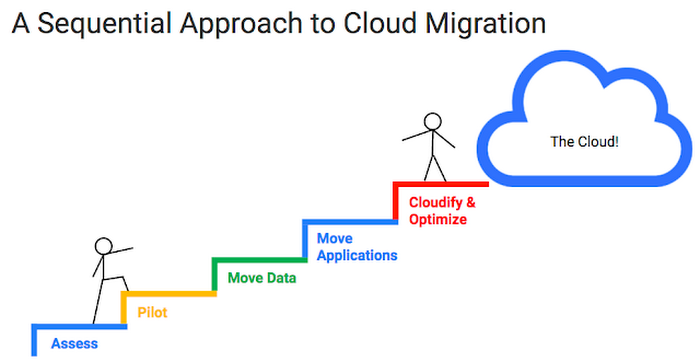
Different companies follow different method for cloud migrations. Cloud suppliers will facilitate businesses set up their migration method. Generally, these basic steps are followed:
1. Establish goals: A company should establish goals to measure against the new set up. This might include expected performance gains, legacy infrastructure outdate time. This helps to compare if migration is good idea or not.
2. Prepare a security strategy: A distinct approach is needed for Cloud cybersecurity compared to on-premises security. Within the cloud, company assets aren’t any longer behind a firewall, and therefore the network perimeter basically doesn’t exist. Deploying a cloud firewall or a web application firewall is also necessary.
3. Copy over data: Choose a cloud vendor, and copy existing databases. This needs to be done continuously throughout the migration process so that the cloud database remains up-to-date.
4. Move business intelligence: It should be checked that whether the application or code needs to be changed. An application should only be refactored if it makes financial sense to do so. If online migration is done, bandwidth calculation should be done.
5. Switch production from on-premises to cloud: Workload should be optimized and stress tested to deliver expected performance. The cloud goes live. The migration is complete.
Companies might close their on-premise systems, or might keep them for backup or for Hybrid-Cloud deployment.
Various Cloud Deployment Styles:

Organizations need to decide which deployment style to choose.
Multicloud: Two or more public clouds are combined in this, which are shared by more than one customer. It serves multiple purposes such as backup/redundancy, cost efficiency, taking different services from different clouds.
Public Cloud: In this, services are provided by a third-party provider over the internet. It has many advantages, and as a result it is the most common type of deployment. Example- AWS, GCP and MS Azure.
Private Cloud: In this, cloud resources are used only by single company. Example- Hewlett Packard Enterprise (HPE), Dell, IBM and Oracle.
Hybrid Cloud: It merges two or more types of clouds, i.e. public clouds, private clouds or on-premise legacy datacenters. It needs tight integration among all deployed clouds and datacenters to work well.
Single Cloud: Using a single cloud is not feasible but can be done. Cloud vendors offer public and private clouds, private can’t be shared with other organizations.
Conclusion:
Even though there are a few challenges in migrating to cloud, it is worth the effort to do so as cloud offers many benefits and can help a company grow or sustain in the market.

Linux is an open-source operating system based on the Linux kernel.
Linux allows users to create and delete partitions, one way of doing so is by using the fdisk command from Terminal.
A primary partition is any of the four possible partitions into which a hard disk drive (HDD) can be divided.
A partition is a logically independent division on a HDD. Whole OS can be installed in an unpartitioned HDD. However, dividing a HDD into different partitions has some advantages, like installing multiple OS on the same HDD.
Even though there can only be four primary partitions, it is possible to create a number of additional partitions. This is done by dividing one of the primary partitions into sub-partitions, called logical partitions. The partition which is divided is called Extended partition.
Useful commands for partitioning:
fdisk -l : To list the partition table of a device
• p – print the partition table
• n – create a new partition
• d – delete a partition
• q – quit without saving changes
• w – write the new partition table and exit


Thus by using the fdisk command we can easily create and delete partitions in our Linux system.

“It is a code segment that accesses shared resources and should execute as an atomic action.“
Critical Section comes under the topic Process Synchronization.
It is a code segment that accesses shared resources and should execute as an atomic action. If the number of processes accessing the same code segment is greater than one, then that segment is known as critical section.

If a process is in a critical section, all different processes that access the shared changeable resources are denied entry from critical section. In a cluster of co-operating processes at a particular time, solely one process can execute in critical section. Other processes will have to wait for the process in critical section to complete its execution.

Different codes or processes could carry with it an equivalent variable or different resources that require to be scan or written however whose results rely upon the order within which the actions occur. For instance, if a variable ‘x’ is to be scanned by method A, and method B should write to an equivalent variable ‘x’ at the same time, method A would possibly get either the previous or new value of ‘x’.
In cases like these, a critical section is very important. In the aforementioned case, if A must browse the updated value of ‘x’, executing process A and process B at an equivalent time might not provide needed results. To stop this, variable ‘x’ is secured by a critical section. First, B gets the allowance to the section. Once B completes writing the value, A gets the access to the critical section and variable ‘x’ may be browsed.
To allow and deny the processes from moving into the critical section, it proves troublesome for the OS .
The result can not be foreseen if a thread is attempting to alter the data of shared variable at the same time as different thread is trying to retrieve the value.
Let’s take n number of processes {R0, R1, …. Rn-1}.
Every process has critical section segment of code.
This is an example post, originally published as part of Blogging University. Enroll in one of our ten programs, and start your blog right.
You’re going to publish a post today. Don’t worry about how your blog looks. Don’t worry if you haven’t given it a name yet, or you’re feeling overwhelmed. Just click the “New Post” button, and tell us why you’re here.
Why do this?
The post can be short or long, a personal intro to your life or a bloggy mission statement, a manifesto for the future or a simple outline of your the types of things you hope to publish.
To help you get started, here are a few questions:
You’re not locked into any of this; one of the wonderful things about blogs is how they constantly evolve as we learn, grow, and interact with one another — but it’s good to know where and why you started, and articulating your goals may just give you a few other post ideas.
Can’t think how to get started? Just write the first thing that pops into your head. Anne Lamott, author of a book on writing we love, says that you need to give yourself permission to write a “crappy first draft”. Anne makes a great point — just start writing, and worry about editing it later.
When you’re ready to publish, give your post three to five tags that describe your blog’s focus — writing, photography, fiction, parenting, food, cars, movies, sports, whatever. These tags will help others who care about your topics find you in the Reader. Make sure one of the tags is “zerotohero,” so other new bloggers can find you, too.

 Zaid's blog